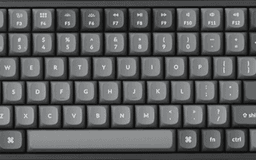
I spent three years typing on a generic $20 membrane keyboard that came bundled with my office PC. It was fine in the way that a bus seat is fine — functional, forgettable, mildly uncomfortable after a while. Then one afternoon my right wrist started acting up during a long writing session and I realized the keyboard I'd been ignoring deserved a second look. After two weeks of research, I bought the Keychron K2 V2 with Gateron Brown switches and RGB backlight. I've been using it daily for about four months now, and I have opinions. Strong ones.

Unboxing and First Impressions
The box is clean and minimal — very much the Apple-adjacent aesthetic that Keychron has leaned into. Inside you get the keyboard itself, a braided USB-C cable, a keycap puller, a few extra keycaps (both Mac and Windows legends), and a small screwdriver for adjusting the feet. The keyboard has a brushed aluminum top plate that sits over a plastic base. When I lifted it out of the box, my first thought was that it weighed more than I expected — it's 800+ grams with the battery. That density translates to zero flex. This thing doesn't creak or wobble; it just sits there solidly.
The 75% layout is the main selling point of the K2 over the smaller K6. You get a compact form factor without losing the function row, arrow keys, or dedicated Delete/Home/End/Page Up/Page Down keys. If you're coming from a full-size keyboard, you'll barely notice what you're missing. The only thing that's gone is the numpad, which I never used anyway.
The Typing Experience: Gateron Browns
I went with Gateron Brown switches specifically because I work in a shared office occasionally and didn't want to be that person with the clicky keyboard. Browns have a tactile bump — you feel a distinct resistance point as the key actuates — but they don't produce the loud click of blues or greens. The sound profile is more of a dense thud, somewhere between the squishy slap of membrane keys and the sharp crack of a blue switch. After two days of adjustment, my typing speed actually increased. There's something about having physical confirmation of a keypress that lets you type lighter and faster.
Bottoming out the keys feels satisfying rather than painful. On a membrane board, I was unconsciously hammering keys down to make sure they registered. With the K2, the tactile bump tells you the keypress went through before the key hits the bottom, which reduces the force I apply. My wrist discomfort improved within the first week.
"After four months, typing on anything else feels like swimming in slow motion. The Browns hit a sweet spot between feedback and quiet that I didn't know I needed."
Bluetooth Multi-Device: Clever but Occasionally Flaky
One of the K2's best features is the ability to pair with up to three devices simultaneously via Bluetooth and switch between them using Fn+1, Fn+2, Fn+3. In practice this means I have it paired to my MacBook Pro, my iPad Pro for note-taking, and my work laptop. Switching takes about 1-2 seconds — the keyboard disconnects from one device and reconnects to another. Most of the time, it works seamlessly.
But 'most of the time' isn't 'always.' I've had moments where the keyboard drops the Bluetooth connection entirely, usually when waking the Mac from sleep. It reconnects within 5-10 seconds once I type a key, but in the middle of a train of thought, that pause is noticeable. It happens maybe once every few days. Not a dealbreaker, but worth knowing.
Battery Life and RGB
Keychron rates the K2 at 72 hours with RGB fully on and up to 240 hours with the backlight off. I leave the RGB on most of the time because I work at a desk in a slightly dim room and I like the aesthetic. In practice, I charge it every 2-3 weeks with moderate RGB use, which tracks with the advertised numbers. You charge via USB-C, the same cable included in the box.
The RGB has 15+ lighting modes. Some of them are genuinely cool — the breathing effect and the static warm white are my go-tos. Others are comically garish (looking at you, rainbow wave). The RGB is visible even through opaque keycaps because of how the LEDs are positioned, which gives everything a glowing look. If you work nights or in a dark office, this makes the keyboard feel far more premium than the price suggests.
Mac and Windows Compatibility
There's a physical switch on the side of the keyboard that toggles between Mac and Windows mode. In Mac mode, the modifier keys are laid out for macOS (Command, Option, Control). In Windows mode, they swap to Windows key, Alt, Control. Keychron ships the keyboard with both Mac and Windows keycap sets included, so you can swap the legends to match whichever OS you're on. I use it with a Mac 95% of the time and the switch has worked perfectly. When I connected it to my Windows work laptop, there was no driver installation — it just worked.
Where It Falls Short
What I Wish Was Better
No wrist rest included — the keyboard is thick (roughly 35mm at the front), and without a wrist rest you'll feel the angle after a long session. I bought a separate wooden one for $30 and it helped immediately.
Bluetooth can occasionally stutter when switching between devices right after waking from sleep. Reconnects quickly but is mildly annoying.
No 2.4GHz dongle on the V2. If you need the absolute lowest latency wireless connection for gaming, this model isn't it. The V3 adds a 2.4GHz option.
The stock keycaps are PBT but have a smooth, slightly oily texture fresh out of the box. After a few months of use they feel better, but aftermarket PBT keycaps from vendors like KBDFans or Milkyway are a noticeable upgrade.
The incline on the higher feet setting is quite steep — steeper than most keyboards. Some people love it, others find it strains the wrists. Experiment before committing to a setup.
Who Should Buy This?
Buy it if: you work from home on a Mac and want a wireless mechanical keyboard that doesn't break the bank, you switch between a laptop and tablet regularly, or you've been curious about mechanical keyboards but want something polished and not gamer-esque.
Skip it if: you're a competitive gamer who needs 2.4GHz low-latency wireless, you absolutely require a numpad, or you have very small hands and find compact keyboards frustrating.
The Keychron K2 V2 retails around $90 for the RGB Bluetooth version, which is excellent value for a mechanical keyboard at this build quality. I'd give it a solid 8 out of 10. The Bluetooth quirks and the mandatory wrist rest purchase hold it back from a higher score, but as a daily driver for remote work it's transformed how I think about my desk setup.