Featured Review

Apple Watch Series 10 vs Garmin Venu 3: Smartwatch vs Fitness Watch
80.0Read →
New

Wiylee

@wiylee

Trust Score
8Total Buzzes
0Followers
5Following

I Replaced Every Hanger in My Closet and Somehow It Changed My Life

No ratings yet

My closet used to be a disaster — not in a dirty way, just in a chaotic way. Wire hangers bent over time and left dents in jacket shoulders. Plastic hangers cracked and broke. Everything hung at different heights because no two hangers were the same thickness. Clothes fell off constantly, usually in the middle of the night with a sound like someone dropping a book. I'd been meaning to fix this for two years. On a Sunday afternoon when I had nothing better to do, I bought a 50-pack of Amazon Basics slim velvet hangers. Two hours later, every hanger in my closet was the same. The difference was immediate and I'm slightly embarrassed by how much it affected me. What Changes Immediately Visual uniformity is underrated. When every hanger is black, slim, and the same height, the closet looks intentional. It looks like someone put thought into it. Mine looks like a boutique now, or at least like a person who has their life marginally together. This sounds superficial and it is, but it turns out the visual chaos of a mismatched closet was creating low-grade stress I wasn't fully aware of until it was gone. The second immediate change: space. The velvet hangers are about 5mm thick — substantially slimmer than standard plastic hangers (which run 10-14mm) and dramatically slimmer than padded or wooden hangers. Switching 50 wire/plastic hangers to 50 velvet hangers freed up about 6-8 inches of rod space. That's enough to hang 8-10 more shirts. For a city apartment where every inch counts, this matters. The Non-Slip Feature: Does It Actually Work? The entire value proposition of velvet hangers over plastic is that the velvet surface grips fabric and prevents clothes from sliding off. I tested this with every type of garment I own: cotton t-shirts, silk-ish blouses, dresses with spaghetti straps, jeans, dress shirts. The velvet works. Silk-adjacent tops that would slide off plastic hangers in a light breeze stay put. T-shirts don't creep to one side and fall off the narrow tip. The only things that still occasionally fall are very slippery synthetic athletic shorts — the contact surface isn't wide enough on those. The 360-Degree Swivel Hook The chrome hook rotates a full 360 degrees, which makes hooking the hanger onto the rod from any angle effortless. It also means the hangers can face any direction, useful if your rod runs at an angle or you're hanging things on door hooks. The chrome finish has stayed shiny with no rust after 3 months of bathroom humidity (I keep a few in the bathroom for airing out clothes post-shower). The Notches for Straps There are small shoulder notches for keeping straps in place. They work for most clothes — standard dress straps and tank top straps stay put. For very thin or narrow straps (some spaghetti strap tops), the notch isn't deep enough and the strap can still slide out. This is a minor frustration, not a dealbreaker. "A $25 investment turned a chaotic closet into something that actually looks organized. That's a better return than most things I've spent money on this year." Where They Fall Short Honest Criticisms Not suitable for heavy items. Heavy winter coats, thick wool blazers, or wet towels will bend these hangers over time. They're designed for clothing, not load-bearing. Keep your wooden or thick plastic hangers for heavy items. The velvet surface collects lint, pet hair, and dust visibly on black fabric. If you have pets or a linty wardrobe, plan to lint-roll the hangers periodically. The grip feature is occasionally too effective: sliding clothes along the rod quickly is more friction than with plastic. If you're the type who grabs clothes in a rush, this can be mildly annoying. The shoulder notches are shallow. Very thin spaghetti straps can slip out. Some hangers in the 50-pack arrive slightly bent at the hook. Out of 50, I had 3 that were noticeably off. Usable, but imperfect. They're not suitable for wet/damp items — water will mat the velvet and potentially cause the cardboard core to warp. Air-dry clothes before hanging. Who Should Buy This? Buy them if: you're doing a closet overhaul, you have limited rod space and need the slimmest possible hangers, clothes fall off your current hangers regularly, or you want your closet to look organized with minimal effort. Skip them if: you need to hang heavy coats or wet items, you want quick grab-and-go convenience without the extra grip friction, or you have pets whose hair will cover the black velvet constantly. The Amazon Basics velvet hangers are one of those upgrades that's hard to explain the value of until you've done it. My rating: 7.5 out of 10. They're cheap, they solve the problems they're designed to solve, and the visual improvement to an organized closet is genuinely satisfying. The lint issue and inability to handle heavy items are real limitations but don't undermine their core purpose.

Read more


Product product image

The $6 T-Shirt Test: Can Amazon Essentials Actually Replace Your Basics?

No ratings yet

The quest for the perfect plain t-shirt is one of those low-stakes obsessions that creeps up on you. You want something that looks clean, lasts through a hundred washes, fits without looking sloppy, and doesn't cost $30 per shirt. I've tried Hanes (too thin), Fruit of the Loom (inconsistent sizing), Uniqlo Supima (the benchmark but $15-20 each), Kirkland from Costco (genuinely solid, great value if you have a Costco membership), and now Amazon Essentials, which sells a 2-pack for around $12-15. I bought three 2-packs and wore them through 10+ washes. Here's the honest verdict. The Fabric: Fine, Not Great Amazon Essentials men's crewneck tees are 100% cotton in a medium-weight knit. They're not thin like a Hanes Beefy-T, not thick like Uniqlo's Supima Air Cotton. They're somewhere in the middle — a fabric that feels acceptable for a t-shirt but not exceptional. The first time I put one on, my impression was 'adequate.' Not a bad impression, just not a memorable one. The cotton softens noticeably after 3-4 washes as it breaks in. White shirts: these are thin enough that you can see through them slightly in bright light. If you want an opaque white t-shirt for wearing on its own, size up or look at Hanes Beefy. Gray and navy hold up much better — no transparency issues on darker colors. Fit: True to Size, Useful Shape I ordered my usual size (medium) in navy and navy fits as expected — chest and shoulders are correct, length hits the hip, sleeves are slightly longer than fashion-length but shorter than a boxy vintage tee. The cut is 'regular' fit, which is baggy enough to be comfortable but not oversized. It works under flannels, hoodies, and on its own for errands. I wouldn't call it slim or fitted — if you want your shirts to drape across the chest, buy a size down. One caveat: sizing consistency varies between colorways and batches. I bought three 2-packs and found a slight difference in shoulder seam placement between my navy and white mediums. Not dramatic, but noticeable side-by-side. This inconsistency is a known issue with Amazon Essentials across categories. After 10+ Washes: The Real Test This is where t-shirts prove or fail themselves. After 10 machine washes on warm and tumble dry medium: Shrinkage: minimal on the first wash (~1-2% length), none after. Did not continue shrinking after the initial wash. Collar stretch: the collar on my navy shirt has loosened slightly and now has a slight V-shape from stretching. Not dramatic, but present. Color fading: navy went from medium-dark to slightly muted. Not washed-out, but not as vibrant as new. White stayed white with no yellowing. Pilling: minimal pilling on the underarm area and where a bag strap sits. About what you'd expect from cotton at this price. Shape retention: mostly good — the shirt still looks like a t-shirt and not a sack. The Value Calculation At $6 per shirt, how do these compare over time? If a Uniqlo Supima lasts 3 years of weekly wear ($15-20 upfront) vs. an Amazon Essentials shirt lasting 18 months before the collar is too stretched ($6 upfront), the cost-per-use actually favors Uniqlo. However, if you're buying basics for activities that destroy shirts — yard work, painting, moving, gym use — spending $6 instead of $20 per shirt makes obvious sense. "At $6 a shirt, Amazon Essentials makes total sense for workout wear, yard work, or backup shirts. At that price, replace them every year and you're still spending less than buying premium." Where They Fall Short Genuine Criticisms White shirts are semi-transparent in bright light. Not appropriate as standalone white tees unless you're okay with that. The collar stretches over months of washing. Not a dealbreaker but noticeable. Sizing can vary slightly between colorways in the same order. The cotton feels slightly stiff until broken in — the first two washes improve this significantly. They wrinkle easily. Fold them promptly after drying or wear the wrinkles all day. Some versions have a sewn-in tag rather than being tagless. The tag is scratchy. Check the listing before buying — tagless versions do exist. Who Should Buy This? Buy them if: you need cheap workout shirts, undershirts, or activity-specific basics you don't mind replacing every year, you're a college student stocking a wardrobe on a budget, or you want disposable basics for travel or moving. Skip them if: you want a premium feel and long-lasting fabric (look at Uniqlo Supima or Pima cotton options), you need fitted/slim cut shirts for a specific look, or you're buying white shirts to wear without a layer over them. The Amazon Essentials crewneck does what it promises at the price it promises. It's not a shirt that will become your favorite — it's a shirt that does the job and costs nothing to replace. My rating is 6.5 out of 10. Right product, right price, wrong expectations if you come in hoping for something Uniqlo-quality.

Read more
Product product image

I Put an Echo Dot in Every Room. Here's What I Actually Use It For

No ratings yet

I resisted smart speakers for years. The privacy implications bothered me, Alexa's limitations frustrated my early-adopter friends, and the idea of talking to a hockey puck in my kitchen felt absurd. Then a friend gifted me an Echo Dot. I set it up reluctantly, expected to return it, and instead bought three more over the next two months. This is an honest account of what the Echo Dot is genuinely good at, where it disappoints, and whether the privacy trade-off is worth it. Setup: Genuinely Painless I want to give credit where it's due: setup is effortless. Plug it in, open the Alexa app, tap 'Add Device,' follow the prompts, connect to Wi-Fi, done. It took five minutes including creating the account. No driver downloads, no firmware fumbling. The sphere design of the newer Echo Dots sits unobtrusively on a counter or shelf and the LED ring glows blue when listening — a visual cue I've actually come to appreciate. What I Actually Use It For Timers (The Undisputed MVP) I set timers more than any other Alexa command. 'Alexa, set a 12-minute timer for the pasta.' 'Alexa, set a 25-minute focus timer.' 'Alexa, how much time is left?' It handles multiple concurrent timers, which my oven can't. This sounds trivial but it's genuinely changed how I cook. No more checking the oven clock repeatedly. Music and Podcasts Linked to Spotify, the Echo Dot works as a hands-free speaker for the kitchen and bathroom. The audio quality on the newer models is better than you'd expect for the form factor — clear mids, acceptable bass. It's not a high-fidelity speaker, but for background cooking music or morning podcasts, it's more than adequate. I use multi-room audio to play the same Spotify session across three Echo Dots simultaneously, which feels genuinely magical the first few times. Smart Home Control This is where the Echo Dot earns its rent if you already have smart home devices. I have Philips Hue lights and a few smart plugs throughout my place. 'Alexa, turn off the living room lights' or 'Alexa, set bedroom lights to 30%' works consistently. No fumbling with apps. 'Alexa, goodnight' triggers a routine that turns off all lights and sets the bedroom to dark. This integration makes the Echo Dot feel like infrastructure rather than a gadget. Sound Quality Expectations The Echo Dot is a 3-inch spherical speaker with no subwoofer. It sounds good for its size — better than your laptop speakers, cleaner than most Bluetooth portable speakers under $30. But it's not a music speaker in any serious audiophile sense. Bass is thin on music with heavy low end. At high volume (above 70%), it can distort slightly. I use mine for podcasts, news briefings, cooking music, and casual listening. For serious music listening, I stream to my Sony headphones. "The Echo Dot is worth $50 if you already have smart home devices or want an effortless kitchen speaker. It's not worth $50 if you just want a Bluetooth speaker." Privacy: The Honest Reckoning The Echo Dot listens for its wake word ('Alexa') continuously. Amazon states that audio is only sent to its servers after the wake word is detected. There is a physical mute button that cuts power to the microphones — a hardware disconnect, not just a software flag. The LED ring turns red when muted. I don't fully trust any always-on microphone. Amazon has had documented incidents of accidental recordings and has disclosed that human reviewers listen to some recordings to improve Alexa's accuracy. You can review and delete your voice history in the Alexa app. I do this monthly. It's a trade-off I've made consciously, but I haven't convinced everyone in my life to be comfortable with it. Where It Falls Short Honest Criticisms Alexa misunderstands commands more than I'd like. "Play jazz" became "play Jaws" on three separate occasions. "Alexa, play something mellow" is interpreted unpredictably. Amazon monetizes your attention aggressively. After answering a question about weather, Alexa will sometimes add "by the way, have you tried Amazon Fresh grocery delivery?" These unsolicited upsell moments are genuinely annoying. The shopping list integration is Amazon-centric by design. Anything you add to your Alexa shopping list can be one-click ordered on Amazon. It's convenient and it's also a revenue-generating behavioral loop. Google Assistant is meaningfully better at answering factual questions and conversational follow-ups. Alexa excels at smart home commands and music; Google wins on general knowledge. No screen means you're guessing at visual information. "What's the weather?" is great. "What does this rash look like?" requires your phone anyway. If your Wi-Fi drops, the Echo Dot is an expensive paperweight. Local processing is limited. Who Should Buy This? Buy it if: you have or plan to build a smart home setup, you want a cheap kitchen/bathroom speaker that responds to voice commands, or you already use Alexa on other devices. Skip it if: you're privacy-conscious and uncomfortable with always-on microphones, you prefer Google's ecosystem or Assistant, or you want a serious audio device. At $50 (often on sale for $30-35), the Echo Dot is an easy recommendation for specific use cases. My rating: 7 out of 10. Amazon's persistent monetization behavior and Alexa's accuracy gaps prevent a higher score, but as a smart home voice controller and casual speaker, it earns its spot in my apartment.

Read more
Product product image

I Did the Math: Amazon Basics Rechargeable Batteries Save You Real Money

No ratings yet

I did an audit of my apartment last year and counted the battery-powered devices: two TV remotes, one Xbox controller, two computer mice, one wireless keyboard, two flashlights, a digital clock, two kids' toys (I occasionally babysit), and a smoke detector. That's 11 devices, most of which eat AA batteries at different rates. I was spending about $60-80 a year just on Energizer AAs from the grocery store. That math started to bother me. So I bought the Amazon Basics 8-pack rechargeable AA set with the charger for about $25 and started tracking. The Financial Breakdown A 24-pack of Energizer Max AAs costs around $18-22. At my consumption rate, I was burning through 3-4 packs a year across all my devices, putting annual battery spend at roughly $55-80. The Amazon Basics rechargeables at $25 for 8 batteries plus charger can theoretically be recharged up to 1,000 times. Even if half those cycles are wasted or the batteries degrade faster, that's still hundreds of uses per battery over 3-4 years. The math works out to something like $3-5 of electricity cost for the same number of 'charges' that would cost $200+ in disposables. Is the savings dramatic in year one? No. You're spending $25 upfront instead of $20 on disposables. But in year two, year three, and year four, you're mostly spending nothing while others keep buying packs. Real-World Battery Performance The Amazon Basics rechargeables are rated at 2000mAh capacity. For comparison, fresh Energizer Max AAs deliver approximately 2800-3000mAh. Eneloop standard rechargeables (the gold standard for rechargeable AAs) deliver 1900mAh. So the Amazon Basics are middle-of-the-road. In practical terms: in my wireless mouse, I get about 3-4 weeks between charges, compared to 5-6 weeks with fresh Energizers. In my Xbox controller, battery life is roughly equivalent to disposables for the first half of the cycle but drops faster toward the end. In flashlights, they work fine until they don't — rechargeables have a more abrupt voltage cutoff than disposables, so the light dims quickly near the end rather than fading gradually. The Charger The included charger is a 4-slot NiMH charger with fold-down prongs for travel. It has a single LED that glows red during charging and turns green when complete. Charge time for four discharged batteries is approximately 4 hours. The charger also has a USB port that can charge your phone — a nice bonus. Build quality is adequate: it's plastic and feels it, but it's done the job for a year without issues. Environmental Impact This is hard to quantify precisely, but I've thrown away exactly zero AA batteries in the past year versus dozens in prior years. Alkaline batteries contain mercury, zinc, and manganese oxide that can leach into soil when landfilled. The production impact of one rechargeable battery is higher than one disposable, but the lifecycle advantage of 500-1000 charge cycles means the net environmental calculus heavily favors rechargeables over a multi-year horizon. Where They Fall Short Honest Disappointments Self-discharge rate is higher than Eneloop. These batteries lose charge sitting in a drawer faster than Panasonic Eneloops (which use "low self-discharge" technology). If you charge them and store for a month, expect ~15-20% loss. Eneloops lose maybe 5% in the same period. The charger provides no individual battery status indicator — one LED for all four slots. You can't tell if one battery in a group of four is failing. Charging requires batteries in pairs (or all 4) — you can't charge a single battery. If one dies mid-session, you're waiting for a pair to charge. 4-hour charge time is slow. Some fast chargers (like the La Crosse BC-700 or Nitecore) can do it in 1-2 hours and include battery health diagnostics. Performance in high-drain devices like flashes or high-powered flashlights is noticeably weaker than Eneloop Pro or Energizer Ultimate Lithium. The Eneloop Pro delivers 2550mAh — 25% more capacity. They don't perform as well as lithium batteries in extreme cold (below freezing) — relevant for outdoor/camping use. Who Should Buy This? Buy them if: you have multiple remote controls, wireless peripherals, or kids' toys that eat through disposable batteries, you want a simple entry point to rechargeable batteries without spending $40+ on Eneloops, or you care about reducing battery waste. Skip them if: you need maximum capacity for high-drain devices (get Eneloop Pro), you want the lowest self-discharge rate for emergency preparedness (get Eneloop standard), or you need fast charging capability. For most people in most situations, these do the job and save real money over time. My rating is 7 out of 10. The slow charger and higher self-discharge compared to Eneloop hold them back from being the 'best' rechargeable option, but for everyday household use at this price, they're a solid and logical buy.

Read more
Product product image

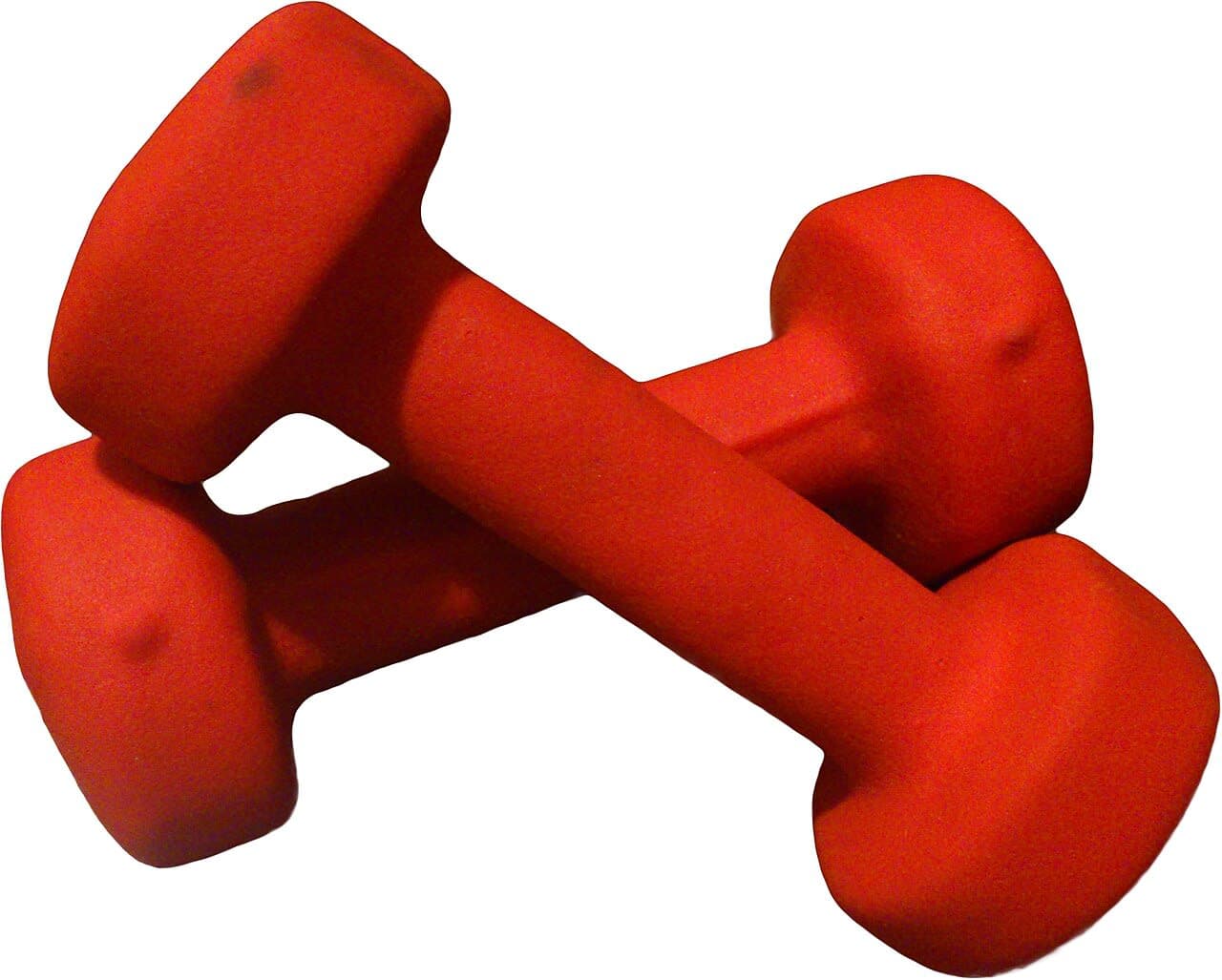
Are Amazon Basics Dumbbells Actually Good? 6 Months Later, Here's My Answer

No ratings yet

During a period when gym memberships went from nice-to-have to out-of-reach for a few months, I started building a small home workout setup. Dumbbells were the obvious first purchase. The cheapest options at my local sporting goods store were $3-4 per pound — about $150 for a pair of 20lb dumbbells. I found Amazon Basics neoprene-coated dumbbells for roughly $1.50-2 per pound. Six months of regular use later, I have a clear answer to 'are they worth it?' First Impressions: Simple and Solid The Amazon Basics dumbbells are color-coded by weight — pink for lighter weights, yellow for 10-15lb, blue/green for heavier. The neoprene coating covers the entire dumbbell including the handle, which gives them a softer, more comfortable grip than bare iron or chrome handles. The coating is thick enough to feel protective, thin enough that the dumbbells aren't oversized. The design is traditional hexagonal — flat ends prevent them from rolling away on the floor when you set them down, which sounds obvious but is genuinely useful. The weight markings are embossed into the end caps and haven't faded. Six months in, mine look almost identical to when I bought them. Build Quality After 6 Months This is the real test. I've used these for bodyweight-adjacent exercises: bicep curls, shoulder presses, lateral raises, front raises, goblet squats, Romanian deadlifts, and rows. I've dropped them more times than I'd like to admit. The neoprene hasn't cracked, chipped, or developed any tears. There's no smell anymore (there was a mild rubber smell for the first week or two that ventilated away). The handle area has some minor wear marks from chalk residue but nothing structural. Durability at this price point is genuinely good. I've seen cheaper dumbbells develop coating separation or handle wobble within months. These haven't. Comfort During Use The neoprene is forgiving on bare hands — you don't need gloves. The textured grip is subtle enough that it doesn't abrade your palms but present enough to prevent slipping when sweaty. For exercises where the dumbbell rests against your palm or wrist (goblet squats, certain presses), the soft coating is noticeably more comfortable than metal handles. Space Efficiency and Storage These live under my desk when not in use. A pair of 15lbs takes up barely more space than a shoebox. For apartment dwellers or people who don't have a dedicated home gym room, this matters. They don't need a rack — they can be stacked in a closet corner, slid under a bed, or tucked anywhere. "The best workout equipment is the equipment you actually use. These dumbbells are simple, comfortable, and out of the way. That's more than enough to build a consistent habit." Where They Fall Short Real Limitations Worth Knowing The handles are narrow diameter — about 30mm. If you have large hands, they can feel cramped, especially for gripping exercises. A standard barbell is 28-32mm but with knurling that compensates. These handles are smooth and small. The weight ceiling is a problem. Amazon Basics neoprene dumbbells max out at 32 lbs in the neoprene-coated line. If you advance past that, you'll need to buy different dumbbells entirely. You cannot use them as push-up handles with the lighter weights — your fingers will scrape the floor because the dumbbell diameter isn't tall enough to create clearance. Neoprene picks up dust, lint, and pet hair aggressively. They need a wipe-down every couple weeks or they look grimy. Each weight pair must be purchased separately, which adds up fast if you want a full range. A set from 5-30lbs in 5-lb increments costs $250-400 depending on sales — comparable to mid-range adjustable dumbbells that take up far less space. The hexagonal shape means push-ups directly on the floor work okay for heavier weights, but the flat hex face can dig in on uneven floors. Who Should Buy This? Buy them if: you're a beginner building a home workout routine on a budget, you live in an apartment and need dumbbells that store compactly, or you do light-to-moderate fitness work (strength training, yoga supplements, rehab exercises). Skip them if: you're an intermediate-to-advanced lifter who works above 30 lbs regularly, you want a full dumbbell set without buying multiple pairs, or you have large hands and prioritize grip ergonomics. For what they are — budget entry-level neoprene dumbbells — they hold up well. My rating is 7.5 out of 10. They do exactly what they promise and they do it durably. The weight ceiling and separate-purchase model are genuine frustrations that prevent a higher score.

Read more
Product product image

One Charger for Everything: The Anker 735 Replaced Three of My Adapters

No ratings yet

There's a drawer in my home office that I'm embarrassed by. It contains: one MacBook brick, one 30W USB-C adapter, one old iPhone 12W brick, a tangle of cables, and a surge protector that's so overloaded it looks like a fire hazard in waiting. I've known for years that I should simplify this mess. The Anker 735 — a 65W three-port GaN charger the size of a small soap bar — finally made me do something about it. GaN Technology in Plain English GaN stands for Gallium Nitride, a semiconductor material that's replaced the traditional silicon used in most chargers. The practical difference: GaN chargers run more efficiently, generate less heat at the same wattage, and can be made significantly smaller than silicon-based chargers of equivalent power. The Anker 735 delivers 65W from a charger roughly 40% smaller than the standard Apple 61W MacBook brick. That's the value proposition. Ports and Power Distribution The 735 has three ports: two USB-C and one USB-A. Here's how the power splits depending on what you plug in: One USB-C port only: 65W (full power, great for MacBook charging) Two USB-C ports: first port gets up to 45W, second gets up to 20W All three ports active: approximately 45W + 20W + 10W across the three ports USB-A alone: up to 22.5W (fast charge for phones that support it) In daily use: I plug in my MacBook Air (USB-C1 at 45W), my phone (USB-C2 at 20W), and my earbuds case (USB-A at 5W). All three charge simultaneously and all three are topped up by the time I sit down to work. This replaced three separate adapters. Charging Speed Real-World Tests MacBook Air M2 from 15% to 100% while actively using it: about 1 hour 45 minutes. That's roughly 10% slower than Apple's dedicated 67W charger, which is imperceptible in practice. iPhone 14 Pro from 20% to 100% with USB-C2 at 20W: about 1 hour 10 minutes, slightly faster than Apple's 20W brick because of the efficient power delivery. AirPods Pro case from empty to full: under 45 minutes. Size and Travel Worthiness The prongs fold flat, making this genuinely pocket-sized. I've been keeping the 735 in my laptop bag as my travel-everything charger and I can't overstate how much mental overhead it removes. One adapter, one cable, done. The finish is matte white (black also available), and after three months it shows minimal scuffing. It doesn't overheat alarmingly — gets warm under heavy load but well within what's normal for a high-wattage charger. Where It Falls Short Honest Criticisms The 65W is shared across all ports simultaneously. This is stated clearly in the specs but easy to miss: if all three ports are loaded, your MacBook gets ~45W, not 65W. Fine for maintenance charging while working, slower if you need to top up quickly. The folding prongs feel slightly loose in some wall outlets — there's barely-perceptible wobble. It stays plugged in fine, but it's not as satisfying as the solid lock of an Apple brick. No cables included. At $35-45, this stings. At least one USB-C cable would make this a complete package rather than a charger you have to accessorize. The USB-A port maxes at 22.5W with Quick Charge support. Fine for phones, but if you have a USB-A device that needs more, this isn't it. The GaN charger market has gotten crowded. Competitors like Ugreen, VOLTME, and Baseus now offer equivalent specs at $25-30. Anker still has better brand trust for quality control, but the price premium has narrowed. Who Should Buy This? Buy it if: you travel with a MacBook and hate carrying multiple chargers, you charge a laptop, phone, and earbuds simultaneously, or you want a compact single charger for your desk that handles everything. Skip it if: you need to fast-charge a laptop AND a phone simultaneously at maximum speed (the power split limits this), you want the absolute cheapest GaN option (check Ugreen), or you prefer to carry dedicated single-device chargers for each device. The Anker 735 is a well-engineered product that solves a real problem elegantly. I give it an 8 out of 10. The missing cable and power-splitting caveats are worth understanding before you buy, but for the use case of 'one charger for everything' it's the best option I've used at this form factor.

Read more
Product product image

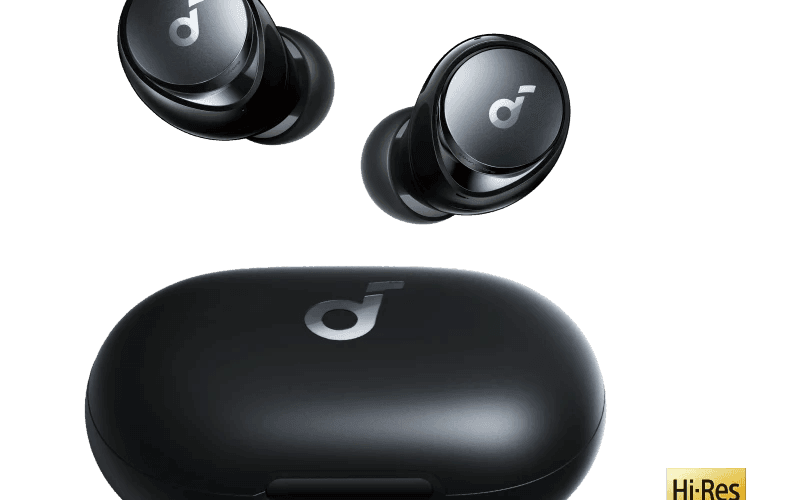
I Stopped Recommending AirPods After Trying These $80 Earbuds

No ratings yet

A friend asked me last month what earbuds to buy. My automatic response used to be 'just get AirPods Pro' because the seamless Apple integration and good ANC made them an easy recommendation. Then I paused, remembered I'd been using the Soundcore Space A40s for the past two months, and gave a different answer. These $80 earbuds had eroded my confidence in reflexively recommending Apple's $250 option. Let me explain why — including where the A40 falls flat. Why Budget Earbuds? I'm not anti-Apple. I use a MacBook and iPhone daily. But I've lost two pairs of earbuds — one fell into a sink, one fell out during a bike ride — and paying $250+ each time feels increasingly unjustifiable. When I saw the A40 reviewed by a few audio channels I trust, with specific mention of the LDAC codec support and 50-hour total battery life, I ordered a pair expecting to be mildly impressed and slightly disappointed. I was more than mildly impressed. Sound Quality: Punching Above Their Weight The Space A40 uses a dual-layer diaphragm driver and supports LDAC, Sony's high-quality Bluetooth audio codec that transfers up to 990kbps (about three times the bandwidth of standard SBC). If you have an Android phone with LDAC support or an LDAC-compatible device, the audio quality jump over standard Bluetooth is audible. Bass is full and controlled, not muddy. Mids are clear — vocals on acoustic tracks and podcasts sound natural. Highs are present without being piercing. Compared to AirPods Pro 2: the A40 has more bass presence and a warmer overall signature. The AirPods have more balanced, neutral sound by default. If you like bass-forward listening (hip hop, EDM, pop), the A40 wins. If you prefer accurate sound for classical or jazz, the AirPods are cleaner. The A40's Soundcore app includes a parametric EQ and HearID — a feature that plays tones and adjusts the sound profile to your specific hearing. After the HearID calibration, music felt tailor-made. ANC That Actually Does Something The adaptive noise cancelling on the A40 adjusts based on your environment — it detects ambient noise levels and applies more or less cancellation accordingly. On a bus or subway, it noticeably reduces the engine rumble and crowd noise. In a coffee shop, it dampens the background hum enough to focus. In a quiet room, ANC in maximum mode produces a slight pressure sensation that some people find uncomfortable — I turn it off when I'm at home. Against wind? Not great. Walking outside on a breezy day, the ANC microphones pick up wind noise that sounds like interference. The AirPods handle wind better. For commuting or office environments, the A40's ANC is excellent. For outdoor use, it's just okay. Comfort and Fit The A40s come with five sizes of ear tips (XS, S, M, L, XL). The default medium fit me perfectly on first wear. After four hours of continuous use, I had zero ear fatigue — they're light, the ear tip material is soft silicone, and the ergonomic shape keeps them in place without putting pressure on the ear canal. I've worn them during workouts, walking, and long video calls without issues. They're IPX4 rated: safe for sweat and light rain, but don't submerge them. Battery Life: The A40's Superpower 10 hours of playtime per charge with ANC on, 13 hours with ANC off. The case adds another 40 hours. That's 50 hours total — which means I charge this thing once a week at most. By comparison, AirPods Pro 2 give about 6 hours per earbud charge with ANC on, 30 hours total. The A40 wins this comparison by a significant margin, and battery life is the thing I actually notice day-to-day. Running out of battery mid-commute is genuinely frustrating; with the A40, it basically never happens. Multipoint Connection The A40 can connect to two devices simultaneously. My phone and laptop are both connected at all times. When I get a call on my phone, audio switches automatically from laptop to phone. When I go back to YouTube on the laptop, audio switches back. This works reliably — I'd estimate a 95% success rate with auto-switching, and the 5% of the time it doesn't switch automatically, I just pause on one device and play on the other. Where It Falls Short Genuine Problems Worth Knowing The case lid is loose — this is a well-documented complaint across reviews. It can open in your bag or pocket, and earbuds can fall out. I bought a silicone case cover for $8 on Amazon to fix this, but I shouldn't have needed to. Call quality is just adequate. In quiet environments, the A40 handles calls fine. In loud environments, callers report that I sound like I'm in a wind tunnel. The AirPods Pro have noticeably better call microphones. No wireless charging on the base model. You have to pay extra for the wireless charging version, which seems like a cash grab at this price point. Touch controls on the earbuds can register accidental presses. Adjusting your earbuds mid-session triggers volume changes or skips. Transparency mode works but has a slight hiss in the background. Not terrible but noticeable in quiet environments. No Apple H1/H2 chip means no seamless device switching within the Apple ecosystem — you have to manually manage connections via the Soundcore app. Who Should Buy This? Buy them if: you commute by bus or train and want solid ANC without paying AirPods prices, you have an Android phone and can take advantage of LDAC, or you're tired of charging your earbuds every day. Skip them if: you make a lot of calls in noisy environments, you're deeply in the Apple ecosystem and want seamless switching, or you need earbuds for outdoor windy conditions. At $80, the Soundcore Space A40 offers sound quality and battery life that genuinely compete with earbuds at twice the price. The loose case lid is annoying and should have been caught in QC, but it's a solvable problem with a $8 accessory. I give these an 8.5 out of 10. If Soundcore fixes the case and adds wireless charging as standard, this rating goes to 9.

Read more
Product product image

The Keychron K2 Changed How I Feel About Working From Home

No ratings yet

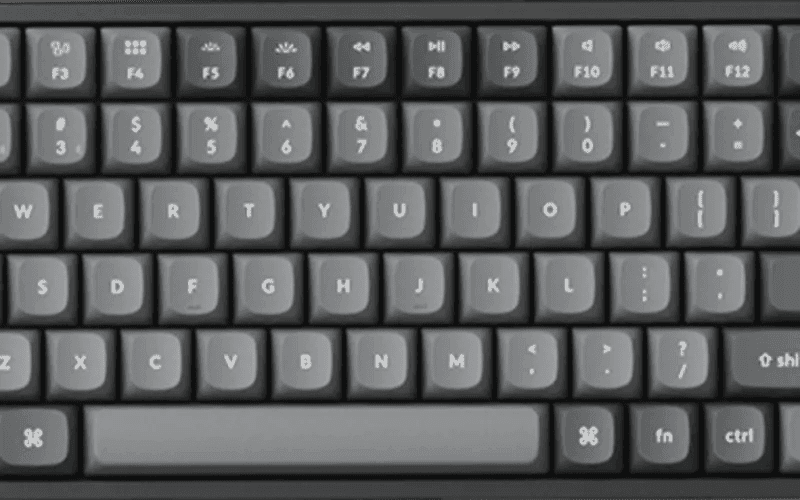
I spent three years typing on a generic $20 membrane keyboard that came bundled with my office PC. It was fine in the way that a bus seat is fine — functional, forgettable, mildly uncomfortable after a while. Then one afternoon my right wrist started acting up during a long writing session and I realized the keyboard I'd been ignoring deserved a second look. After two weeks of research, I bought the Keychron K2 V2 with Gateron Brown switches and RGB backlight. I've been using it daily for about four months now, and I have opinions. Strong ones. Unboxing and First Impressions The box is clean and minimal — very much the Apple-adjacent aesthetic that Keychron has leaned into. Inside you get the keyboard itself, a braided USB-C cable, a keycap puller, a few extra keycaps (both Mac and Windows legends), and a small screwdriver for adjusting the feet. The keyboard has a brushed aluminum top plate that sits over a plastic base. When I lifted it out of the box, my first thought was that it weighed more than I expected — it's 800+ grams with the battery. That density translates to zero flex. This thing doesn't creak or wobble; it just sits there solidly. The 75% layout is the main selling point of the K2 over the smaller K6. You get a compact form factor without losing the function row, arrow keys, or dedicated Delete/Home/End/Page Up/Page Down keys. If you're coming from a full-size keyboard, you'll barely notice what you're missing. The only thing that's gone is the numpad, which I never used anyway. The Typing Experience: Gateron Browns I went with Gateron Brown switches specifically because I work in a shared office occasionally and didn't want to be that person with the clicky keyboard. Browns have a tactile bump — you feel a distinct resistance point as the key actuates — but they don't produce the loud click of blues or greens. The sound profile is more of a dense thud, somewhere between the squishy slap of membrane keys and the sharp crack of a blue switch. After two days of adjustment, my typing speed actually increased. There's something about having physical confirmation of a keypress that lets you type lighter and faster. Bottoming out the keys feels satisfying rather than painful. On a membrane board, I was unconsciously hammering keys down to make sure they registered. With the K2, the tactile bump tells you the keypress went through before the key hits the bottom, which reduces the force I apply. My wrist discomfort improved within the first week. "After four months, typing on anything else feels like swimming in slow motion. The Browns hit a sweet spot between feedback and quiet that I didn't know I needed." Bluetooth Multi-Device: Clever but Occasionally Flaky One of the K2's best features is the ability to pair with up to three devices simultaneously via Bluetooth and switch between them using Fn+1, Fn+2, Fn+3. In practice this means I have it paired to my MacBook Pro, my iPad Pro for note-taking, and my work laptop. Switching takes about 1-2 seconds — the keyboard disconnects from one device and reconnects to another. Most of the time, it works seamlessly. But 'most of the time' isn't 'always.' I've had moments where the keyboard drops the Bluetooth connection entirely, usually when waking the Mac from sleep. It reconnects within 5-10 seconds once I type a key, but in the middle of a train of thought, that pause is noticeable. It happens maybe once every few days. Not a dealbreaker, but worth knowing. Battery Life and RGB Keychron rates the K2 at 72 hours with RGB fully on and up to 240 hours with the backlight off. I leave the RGB on most of the time because I work at a desk in a slightly dim room and I like the aesthetic. In practice, I charge it every 2-3 weeks with moderate RGB use, which tracks with the advertised numbers. You charge via USB-C, the same cable included in the box. The RGB has 15+ lighting modes. Some of them are genuinely cool — the breathing effect and the static warm white are my go-tos. Others are comically garish (looking at you, rainbow wave). The RGB is visible even through opaque keycaps because of how the LEDs are positioned, which gives everything a glowing look. If you work nights or in a dark office, this makes the keyboard feel far more premium than the price suggests. Mac and Windows Compatibility There's a physical switch on the side of the keyboard that toggles between Mac and Windows mode. In Mac mode, the modifier keys are laid out for macOS (Command, Option, Control). In Windows mode, they swap to Windows key, Alt, Control. Keychron ships the keyboard with both Mac and Windows keycap sets included, so you can swap the legends to match whichever OS you're on. I use it with a Mac 95% of the time and the switch has worked perfectly. When I connected it to my Windows work laptop, there was no driver installation — it just worked. Where It Falls Short What I Wish Was Better No wrist rest included — the keyboard is thick (roughly 35mm at the front), and without a wrist rest you'll feel the angle after a long session. I bought a separate wooden one for $30 and it helped immediately. Bluetooth can occasionally stutter when switching between devices right after waking from sleep. Reconnects quickly but is mildly annoying. No 2.4GHz dongle on the V2. If you need the absolute lowest latency wireless connection for gaming, this model isn't it. The V3 adds a 2.4GHz option. The stock keycaps are PBT but have a smooth, slightly oily texture fresh out of the box. After a few months of use they feel better, but aftermarket PBT keycaps from vendors like KBDFans or Milkyway are a noticeable upgrade. The incline on the higher feet setting is quite steep — steeper than most keyboards. Some people love it, others find it strains the wrists. Experiment before committing to a setup. Who Should Buy This? Buy it if: you work from home on a Mac and want a wireless mechanical keyboard that doesn't break the bank, you switch between a laptop and tablet regularly, or you've been curious about mechanical keyboards but want something polished and not gamer-esque. Skip it if: you're a competitive gamer who needs 2.4GHz low-latency wireless, you absolutely require a numpad, or you have very small hands and find compact keyboards frustrating. The Keychron K2 V2 retails around $90 for the RGB Bluetooth version, which is excellent value for a mechanical keyboard at this build quality. I'd give it a solid 8 out of 10. The Bluetooth quirks and the mandatory wrist rest purchase hold it back from a higher score, but as a daily driver for remote work it's transformed how I think about my desk setup.

Read more
Product product image